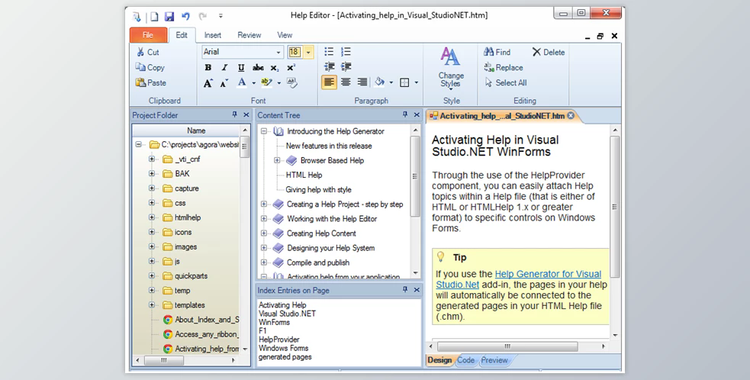
The Help Generator offers help authoring tools for creating help files in CHM format, including browser-based help and printed user manuals. The contemporary Office style help editing tool has many functions to help you become highly efficient and ensure quality output.
Help Generator Great Features:
- Edit with WYSIWYG (HTML) Aid Editor using the latest Windows fluid ribbon.
- Utilize the Help Generator help authoring program to create standard Windows help files, sometimes referred to as the CHM file or a compiled HTML help file and browser-based help for all windows applications.
- Help Generator add-in makes you use a topic-specific page for every form. These pages include an introduction, screenshot, images, and every control section.
- The pages created by the add-in have been automatically integrated into your application to give you immediate F1 support for context-sensitive assistance. Add-ins are compatible with Microsoft Access, Visual Studio .NET, Visual Basic 6, and Microsoft Access.
- The program includes a Help Capture tool to generate entire topic pages using any component of your application user interface, including menus, forms, ... - Again, a time-saver!
- Control over the numerous HTML Help settings lets you unleash the Help Viewer's potential, with options like The Favorites navigation tab and an extra button in the toolbar. To create a chm document, you must install the to-download HTML Help Workshop.
- The web help application is built by using JQuery, and this means it can be used with virtually every browser.
- Use the topic template and Quick Parts to serve as boilerplates for styled pages and pages.
- The topic's content is HTML or XHTML, providing you with complete control over your pages' content.
- Drag and Drop is a feature with numerous uses to efficiency in writing.
- Included are tools to identify and repair broken links on pages, tables of contents, and indexes before publishing.
- Supports Unicode and offers assistance with all languages. It uses OpenOffice spelling libraries, accessible for no cost.
- The user's manual is written using Word. Within Word, the user can download it as a PDF.
- Actual single-source publishing Write the text at once, then publish them to various formats and mediums.
- It is compatible with Windows XP, VISTA, Windows 7, Windows 8, and Windows 10.