
Benefits from Artificial Intelligence (AI) in the process of retouching
Our plugins are made to function in the same manner that professional retouchers work. Following eight years of top-quality Retouching experience, we put in two years studying as well as testing artificial intelligence needed to develop a system of automatic retouching that gives the most natural outcomes.
Using what to preserve the original texture of the skin so that the images look natural in Photoshop?
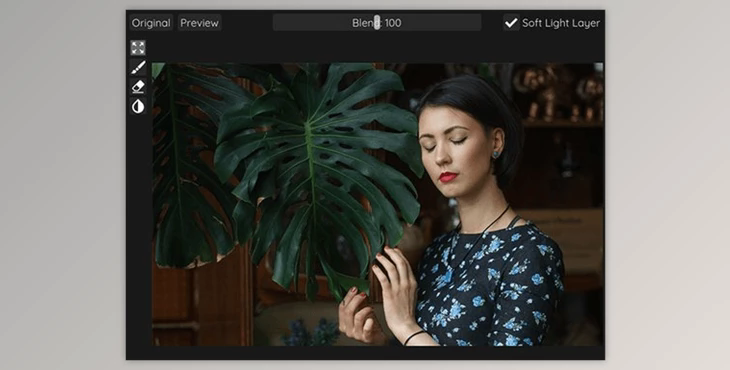
You can edit images naturally using "Retouch4me Dodge & Burn".
Where can I download the product?
After subscription, You can download it for free from here.
The product is in the Photoshop category, for more information about this post, you can click on the home page link in the sidebar.
To search for similar products to Retouch4me Dodge & Burn,
Stand-alone instructions:
Plug-in instructions:
Why do photographers use Retouch4me plugins?
THE MOST DELICATE work
Retouch4me plugins keep the original skin texture, and images appear natural.
One BUTTON RESULT
Simply upload your images by clicking a button, and you will get the results.
BATCH PROCESSING
The photos are processed as you're doing other tasks.
The EASIER THE PROCESSING, the BETTER THE CLIENTS
Retouch4me plugins dramatically cut down on the time spent processing photos.
NO INTERNET ACCESS REQUIRED
Retouch4me plugins are able to work autonomously on a computer local to the.
100 100% CONFIDENTIALITY GUARANTEED
Your client's photos are protected because they don't require to be transferred to an external server.
How to change the graphics card for the plugin to work (Windows only)
1. Open the Windows Registry Editor (regedit.exe): press Window+R, type "regedit",
click OK.
Find the plugin path, for example, Retouch4me Dodge&Burn:
HKEY_CURRENT_USER\SOFTWARE\Retouch4me Dodge Burn
2. Find the ailayersFlags attribute.
If the attribute value is 0, the most powerful graphics card will be used,
A value of 1 includes the second most powerful graphics card, 2 - the third, and so on.
3. Restart the program.
What is Retouch4me Dodge & Burn?
Retouch4me Dodge & Burn is a photo retouching software designed to assist photographers and retouchers in enhancing portrait and beauty images. The "Dodge & Burn" feature in this software is a reference to a common photo retouching technique used in image editing to adjust the brightness and contrast of specific areas of a photo, typically used for skin retouching.
By selectively applying the Dodge & Burn technique, you can create a more polished and balanced appearance in your portrait photos. Retouch4me Dodge & Burn likely offers automated tools or presets that simplify the process of applying these techniques, making it easier and more efficient for photographers and retouchers to enhance their images.
